
Introduction
During peak dinner hours, restaurant teams face a heavy wave of hungry guests. Front desk staff answer non-stop phone calls while visitors walk through the front doors at the exact same time. Servers check tables, and managers work hard to seat everyone quickly. Juggling all these duties at once is hard work. When small details slip away, tables stay empty for too long, and hungry visitors end up waiting longer than they should.
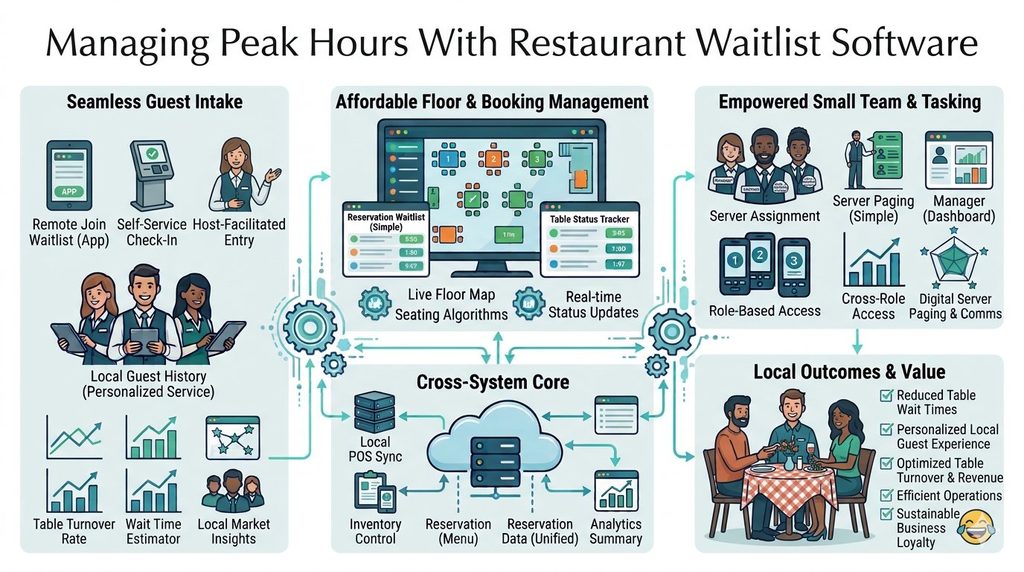
Good organization keeps your daily service running smoothly from start to finish. When your team knows who is arriving and when, they can get ready ahead of time. Restaurant reservation software helps teams manage bookings, seating arrangements, and guest arrivals with ease. This guide explores how digital tools help front-of-house teams handle online bookings, table layouts, and daily workflows.
Understanding Restaurant Reservation Software
Restaurant reservation software is a digital tool that helps restaurants manage bookings, guest details, and seating. Instead of using paper books or phone calls, teams use a digital system to record guest names, party sizes, dates, and times.
When a guest books a table, the system saves the information in one safe place. Staff can check the schedule anytime to see upcoming arrivals. This clear process helps teams prepare for expected guests before they walk through the door.
Old paper booking methods often cause trouble. Staff can lose paper notes, miss phone calls during busy hours, or write down the wrong time. Double bookings happen when two people get booked for the same table at once. Communication gaps between hosts and servers also slow down service.
Think of a busy small bistro. With a paper book, the host must flip pages while answering the phone and greeting guests at the door. If a guest calls to change a time, the host might cross out the old note and make a mistake. With a digital system, the change shows up right away for all staff to see.
How an Online Restaurant Booking System Works
An online restaurant booking system gives guests a simple way to reserve a table through the internet. Guests can open a booking page on a computer or phone. They pick a date, group size, and available time slot.
The process starts when the guest checks open times. Once they pick a slot, they type in their name, phone number, and any special notes. They send in the booking and get a fast confirmation.
Clear booking rules and accurate availability keep the process smooth. The system only shows times when tables are actually free. This stops guests from booking slots that do not exist.
Letting guests book online helps a lot during busy service hours. When the phone rings nonstop, staff cannot always answer it. An online system lets guests book at any hour of the day or night without calling the restaurant.
It helps to know the difference between a booking request and a confirmed reservation. A request means the restaurant must check space and approve it by hand. A confirmed reservation means the table is booked right away based on live openings. DineGlobe uses a direct booking approach that lets guests lock in open tables without waiting for manual approval.
Benefits of a Direct Restaurant Booking System
A direct restaurant booking system is a special booking page controlled by the restaurant itself. Instead of using a shared marketplace, restaurants host their own booking link on their website or social media pages.
This setup gives restaurants a direct way to connect with their guests. When guests book directly, the restaurant keeps all guest data and manages its own booking rules. Staff can set cancellation rules, deposit terms, and special notes for their diners.
Comparing direct bookings with third-party dining marketplaces shows some clear differences. Third-party sites list many restaurants in one spot, which can bring in new visitors. But these platforms often charge high fees per guest and control the guest relationship. Direct booking pages keep the focus entirely on your restaurant and build stronger customer loyalty.
Practical points matter here. Third-party sites offer wide visibility, but direct bookings give you control over your brand and guest list. Using both methods can work, but a direct booking system makes sure you own your guest data and avoid extra commission fees.
How Restaurant Table Management Software Helps Staff
Restaurant table management software connects incoming reservations with live table availability. It helps front-of-house teams track which tables are full, which are empty, and which are about to open up.
The system shows table status, seating space, and reservation times. When guests arrive, the host puts them at a suitable table based on their group size. This clear view helps cut down on double bookings and stops teams from putting large groups at small tables.
Table availability changes constantly during service. When guests arrive, leave, cancel, or ask to move, the host updates the status in the software. Everyone on the team sees the update right away.
Picture a busy dining room on a Friday night. A party of four finishes dessert and asks for the check. Without software, the host might guess when the table will be free. With table management software, the host sees that the table is clearing up and can give a correct wait time to the next guests.
| Feature or Capability | What It Means | How It Helps Restaurant Teams |
|---|---|---|
| Online Booking | Digital page for guest reservations | Lets guests book tables anytime without calling |
| Table Management | Live view of table status and seating | Cuts down double bookings and speeds up seating |
| Floor Plan Layout | Visual map of the dining room | Helps hosts match party size to correct tables |
| Waitlist Tracking | Digital queue for busy periods | Gives real wait times and keeps guests informed |
| Walk-In Log | Record for guests without bookings | Coordinates walk-ins with upcoming reservations |
Understanding Restaurant Floor Plan Software
A digital restaurant floor plan is a visual map of your dining room layout. It shows every table, booth, and bar seat on a screen that matches your actual space.
The digital layout must match your real restaurant setup. If a table sits near the kitchen, the map should show it there. The software helps track seating capacity, combined tables, and table holds.
Table combinations are very useful for changing party sizes. If two small tables sit right next to each other, the software can show how they join to seat a party of four. This helps hosts make the best use of available space.
Common planning mistakes happen when layouts are out of date. For example, treating a broken table as open or putting a large group in a tight corner causes trouble. Keeping your digital floor plan accurate helps staff seat guests in comfort. DineGlobe lets operators map their physical dining room to match their real tables and seating rules.
Managing Busy Periods With Restaurant Waitlist Management Software
A restaurant waitlist becomes useful when all good tables are full or reserved during peak hours. Instead of keeping a messy paper list, staff use restaurant waitlist management software to track waiting guests.
When a guest arrives without a booking, the host writes down their name, phone number, and group size. The system helps guess waiting times based on how fast tables turn over. As tables clear, the queue updates on its own.
Real wait estimates improve guest communication. When guests know how long they will wait, they feel more relaxed. They can wait nearby without constantly asking the host for updates.
Handling late tables or guests who leave the line takes clear steps. If a party takes longer than expected, staff can update the notes. If a guest leaves, the host takes them off the list with a simple tap. General waitlist best practices focus on clear talking and keeping guest details correct.
Choosing Restaurant Reservation Software for Small Restaurants
Independent restaurants need simple, low-cost, and easy-to-manage booking tools. Small teams do not have time to learn hard software or fix tech errors during a busy shift.
When picking a system, look for key factors:
- Ease of use for owners and staff.
- Direct online booking options.
- Clear table availability views.
- Support for daily reservation workflows.
- Simple staff permissions and account access.
- Basic reporting features, where available.
- Fair pricing and helpful support.
- Room to grow as the business gets bigger.
Small restaurants should pick software based on their true needs. Do not buy a complex system just because it has many features you will never use. Pick a tool that fits your budget and daily service style.
The Role of Restaurant Host Stand Software
The host stand is the main hub of front-of-house operations. Restaurant host stand software helps coordinate guest arrivals, bookings, seating, and table use from one screen.
Having a clear view of upcoming bookings helps hosts plan ahead. They can see who has special notes, who is celebrating a birthday, and who is running late.
Organized info helps hosts answer questions fast and talk easily with service staff. For example, if a table arrives ten minutes early, the host can check if their spot is ready or offer a seat at the bar. Handling early arrivals, late guests, and large parties becomes much easier with one central screen.
Handling Walk-Ins With Restaurant Walk-In Management Software
A reservation is an advance booking for a specific time, while a walk-in visit happens when guests show up without notice. Balancing both types of guests is a big part of restaurant work.
Restaurant walk-in management software helps staff record arriving guests fast. The host checks for open tables, tracks seating, and updates availability without messing up the booking schedule.
Walk-in records must stay matched up with existing reservations. If several bookings are arriving at seven o’clock, the host cannot give an empty table to a walk-in if those spots are needed soon. Staff make smart seating choices by checking the schedule before every walk-in placement.
| Common Challenge | Practical Solution | How Software May Help |
|---|---|---|
| Double Bookings | Use a central digital calendar | Blocks conflicting times by itself |
| Incorrect Table Status | Update table states in real time | Shows active table openings to all staff |
| Long Wait Times | Use digital waitlists and estimates | Gives true times and updates guests |
| Walk-In Conflicts | Check upcoming bookings before seating | Matches walk-ins with safe table gaps |
| Unclear Booking Records | Store guest details in one place | Keeps phone, time, and party notes clear |
Is a Free Restaurant Reservation System Suitable for Your Business?
Before picking a free reservation system, restaurant owners should check how it works and what limits apply. Free tools can help you test a digital booking flow before paying for software.
Still, free plans often come with limits. You might face booking caps, fewer staff accounts, basic support, or hidden costs later. It is good to know the difference between a truly free plan, a short free trial, and a limited pilot program.
DineGlobe offers a free pilot program for eligible restaurants. Owners should check the current terms and rules to see if the pilot fits their goals. A free option is a good way to test new workflows with no money risk.
Common Restaurant Booking Problems and Practical Solutions
Restaurant teams face many daily challenges. Knowing how to solve them keeps service running smoothly.
- Duplicate or overlapping reservations happen when two bookings are made at once. Central calendars stop this by blocking taken slots.
- Incorrect table availability causes confusion. Staff must update table states as soon as guests leave.
- Incomplete guest details lead to missed calls or wrong numbers. Ask for phone numbers during online booking.
- Unexpected walk-in arrivals upset seating plans. Keep a few tables open for walk-ins during busy shifts.
- Long or unclear wait times frustrate guests. Use digital waitlists to give honest estimates.
- Late arrivals and cancellations leave empty tables. Clear confirmation messages help cut down no-shows.
- Poor communication between hosts and servers causes slow service. Shared digital screens keep everyone in the loop.
- Outdated floor plans lead to poor seating choices. Check and update your digital map often.
- Confusion about booking rules creates guest disputes. Show clear rules on your booking page.
Software helps fix these problems, but trained staff and clear steps are always needed.
How to Evaluate Restaurant Reservation Software Before Choosing It
Choosing the right software takes careful thought. Follow a simple step-by-step process to find the best fit for your restaurant.
Start by naming your main booking problems. Do you struggle with phone calls, table tracking, or walk-in management? Next, list the required features you need every day. Test the guest booking journey yourself to see how easy it is.
Review how table setup works and get your staff involved in the choice. Your hosts and managers will use the tool every day, so their thoughts matter. Check product support, privacy rules, pricing, and pilot limits.
Test common scenarios before you commit. Try changing a booking, handling a walk-in, and updating a table status. The best system depends on your restaurant size, budget, and daily service style.
How DineGlobe Supports Restaurant Booking Workflows
DineGlobe is a platform designed to connect restaurant bookings with table setup and front-of-house operations. It helps restaurants manage their daily guest flow with practical tools.
Platform features include:
- Direct bookings through a dedicated restaurant booking page.
- Booking records linked to live table availability.
- Physical table setup and seating rules.
- Guest self-service links and confirmation codes.
- Guest arrival logging for hosts.
- Role-based staff access controls.
- Operational info and reports, where available.
- Multilingual screens in English, Japanese, and Arabic.
Check the current status of every feature before you start. Not every feature is active for every pilot user. Planned or limited features should not be treated as live functions.
Restaurant owners can review these features to see if they match their current workflow. Keep your review balanced and focus on what your team needs most.
What Is Restaurant Reservation Software?
Restaurant reservation software is a digital tool that replaces paper books and phone notes. It helps restaurants record guest names, group sizes, dates, and times in one spot so staff can track upcoming arrivals and get ready for service.
How Does an Online Restaurant Booking System Work?
An online booking system gives guests a digital page to view open times. Guests pick a date and group size, type in their contact details, and send the booking. The system checks live space and sends a fast confirmation.
What Is the Difference Between Direct Bookings and Third-Party Bookings?
Direct bookings happen on a dedicated page run by the restaurant, keeping guest data in-house. Third-party bookings come from outside dining sites that list many restaurants, often charging extra fees per guest.
How Does Restaurant Table Management Software Help Prevent Double Bookings?
Table management software links incoming reservations right to live table availability. When a table is booked, the system blocks that slot so staff cannot accidentally assign another party to the same spot at the same time.
What Is Restaurant Floor Plan Software Used For?
Digital floor plan software builds a visual map of the dining room layout. It helps staff track physical tables, seating room, combined tables, and table holds to make the best use of available space.
Can Small Restaurants Benefit From Reservation Software?
Yes, independent restaurants benefit from organized bookings and seating records. Simple digital tools help small teams cut down phone interruptions, avoid schedule mistakes, and run daily service without stress.
How Does Restaurant Waitlist Management Software Work?
Waitlist software helps staff log waiting guests when all tables are full. Staff type in guest names and group sizes, guess waiting times, and update the queue as good tables open up during busy hours.
What Is the Difference Between Reservations and Walk-Ins?
Reservations are advance bookings locked in for a specific time and date. Walk-ins are guests who arrive at the restaurant without a prior booking, requiring hosts to find open seating based on current table status.
Is a Free Restaurant Reservation System Always Completely Free?
Not always. Restaurants should check for limits on bookings, staff accounts, or support. It helps to know the difference between a permanent free plan, a short free trial, and a limited pilot program.
What Should Restaurants Check Before Choosing Reservation Software?
Restaurants should check feature availability, ease of use, pricing, staff needs, and booking workflows. Testing the system with real daily tasks helps make sure it fits the restaurant style.
Conclusion
Running a restaurant dining room takes careful teamwork between bookings, tables, and guest arrivals. Using organized booking records, correct table availability, digital floor plans, waitlists, and walk-in logs supports smoother daily work.
Software works best when staff keep records accurate and follow clear steps every day. DineGlobe offers one platform for restaurants to test direct bookings and front-of-house tasks. A good next step is checking your current booking process and finding the features your team needs most.